Rank: Newbie
Groups: Registered
Joined: 12/29/2025(UTC) Posts: 8  Location: Coimbatore Thanks: 3 times
|
Actually we are trying to view a overprint PDF using the patagames SDK winforms viewer where the PDF designer suggest to turn on overprint preview to see the content in Adobe but we want to show that in patagames viewer. Is there any option similar to the overprint preview in the patagames viewer. For now we are using the blend mode of the object to BlendTypes.FXDIB_BLEND_MULTIPLY to see the full content but it is not accurate and some normal PDF display differently under this circumstances.
|
|
|
|
|
|
Rank: Member
Groups: Registered
Joined: 11/1/2019(UTC) Posts: 23  Location: Rio de Janeiro Thanks: 2 times
Was thanked: 4 time(s) in 3 post(s)
|
I also faced this issue, and I managed to achieve a result that is satisfactory for my needs. For a high-fidelity overprint simulation, I am actually using Ghostscript. However, using strictly the Patagames SDK, I was able to get a very decent result. I found that simply defining the viewer blend mode as Multiply (as you mentioned) was not enough. Instead, I had to programmatically modify the blend mode to Multiply for all pdf objects that have the overprint flag defined. Result using only Patagames SDK: 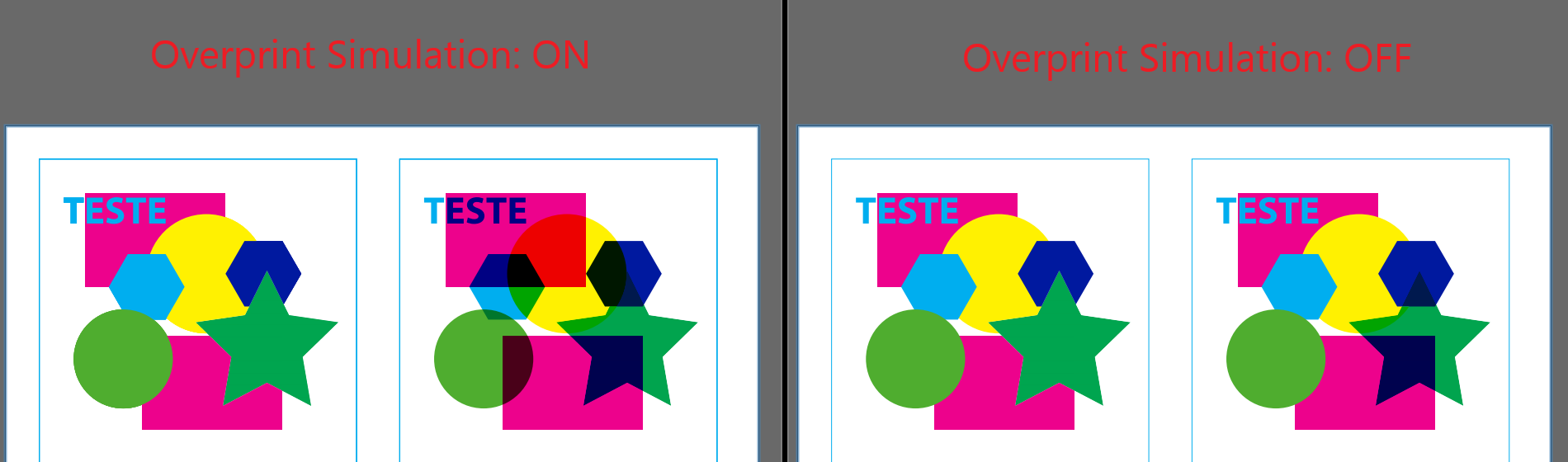
|
|
|
|
|
|
Rank: Newbie
Groups: Registered
Joined: 12/29/2025(UTC) Posts: 8 Location: Coimbatore Thanks: 3 times
|
I also do the same by changing the blend mode of the every object to Multiply but some samples do have this issue where a blue layer is formed above it or else it look totally different from the adobe viewer when the overprint preferences is set to always. And can you share me the code that you used to modify the objects Edited by user Wednesday, January 7, 2026 8:22:22 PM(UTC)
| Reason: Not specified
|
|
|
|
|
|
Rank: Member
Groups: Registered
Joined: 11/1/2019(UTC) Posts: 23 Location: Rio de Janeiro Thanks: 2 times
Was thanked: 4 time(s) in 3 post(s)
|
I use the following function to handle the overprint preview toggle. Code:
private void ProcessOverprintLogic(PdfPage page)
{
    // Ensure the backup dictionary exists for this page
    if (!_objectStateBackup.ContainsKey(page.Handle))
        _objectStateBackup[page.Handle] = new Dictionary<IntPtr, BlendTypes>();

    var pageBackup = _objectStateBackup[page.Handle];

    if (_enableOverprint)
    {
        // --- ENABLE SIMULATION ---
        foreach (PdfPageObject pageObj in page.PageObjects)
        {
            if (pageObj.StrokeOverprint || pageObj.FillOverprint)
            {
                // Save original state if not already saved
                if (!pageBackup.ContainsKey(pageObj.Handle))
                {
                    pageBackup[pageObj.Handle] = pageObj.BlendMode;
                }

                // Apply simulation
                pageObj.BlendMode = BlendTypes.FXDIB_BLEND_MULTIPLY;
            }
        }
    }
    else
    {
        // --- DISABLE SIMULATION (RESTORE ORIGINALS) ---
        foreach (PdfPageObject pageObj in page.PageObjects)
        {
            // Only revert objects previously modified
            if (pageBackup.ContainsKey(pageObj.Handle))
            {
                BlendTypes originalBlend = pageBackup[pageObj.Handle];

                // Restore original blend mode
                pageObj.BlendMode = originalBlend;
            }
        }
    }
}
|
 1 user thanked gffranca for this useful post.
|
|
|
|
Rank: Newbie
Groups: Registered
Joined: 12/29/2025(UTC) Posts: 8 Location: Coimbatore Thanks: 3 times
|
Do you also know a way to remove objects and colors from the PDF ?
|
|
|
|
|
|
Rank: Member
Groups: Registered
Joined: 11/1/2019(UTC) Posts: 23 Location: Rio de Janeiro Thanks: 2 times
Was thanked: 4 time(s) in 3 post(s)
|
I'm not sure what you mean by 'remove objects and colors'. This topic might be useful for remove/hide objects.
|
|
|
|
|
|
Rank: Newbie
Groups: Registered
Joined: 12/29/2025(UTC) Posts: 8 Location: Coimbatore Thanks: 3 times
|
'Remove Color' means removing the colors that are used in the PDF one by one. Eg . CMYK colors, pantone colors etc..., And as for 'Remove Objects' i want to remove a object from the pdf where the mouse cursor is clicked. If you any idea about this it would be helpful and thanks for the above info that helped me a lot.
|
|
|
|
|
|
Rank: Member
Groups: Registered
Joined: 11/1/2019(UTC) Posts: 23 Location: Rio de Janeiro Thanks: 2 times
Was thanked: 4 time(s) in 3 post(s)
|
I also found manipulating Color Separations tricky; it often requires diving deep into the PDF specifications. I believe newer versions of the SDK might expose this information directly within the PageObject properties. However, a viable workaround is to iterate through the PageObjects list, identify objects with the specific color, and modify their matrix to hide them. There is a relevant discussion on that approach here: Manipulating PdfPageObject (Click Here)Regarding the mouse click functionality, the logic is quite similar. You can review this thread for the implementation details: Extract image under mouse pointer (Click Here)
|
2 users thanked gffranca for this useful post.
|
|
|
|
Forum Jump
You can post new topics in this forum.
You can reply to topics in this forum.
You can delete your posts in this forum.
You can edit your posts in this forum.
You cannot create polls in this forum.
You can vote in polls in this forum.
Important Information:
The Patagames Software Support Forum uses cookies. By continuing to browse this site, you are agreeing to our use of cookies.
More Details
Close
