Patagames Software Support Forum
»
Pdfium.Net SDK
»
Common Questions
»
Controls and values not visible on flattened document
Rank: Member
Groups: Registered
Joined: 4/15/2018(UTC) Posts: 24   Location: Sydney Thanks: 2 times
|
Hi I'm having an issue when flattening a PDF before emailing it. When opening the resulting document in Acrobat reader the radio button and checkbox values aren't depicted, nor the controls themselves for that matter. I've attached a screenshot and a copy of the original PDF. Do you have any idea what the issue might be? Other PDFs work, so it might just be this particular document. Thanks! 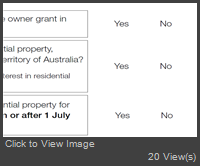  NSW OSR First Home Grant Application.pdf (931kb) downloaded 27 time(s). NSW OSR First Home Grant Application.pdf (931kb) downloaded 27 time(s).
|
|
|
|
|
|
Rank: Administration
Groups: Administrators
Joined: 1/5/2016(UTC)
Posts: 1,140
Thanks: 10 times
Was thanked: 133 time(s) in 130 post(s)
|
The problem is that the Appearanse Stream (AP) dictionary of these annotations is not properly formed. More precisely, the bounding boxes (BBox) are not properly formed. The BBox is an array which must contain a rectangle coordinates in the following order: - left - bottom - right - top. Since in the PDF the origin is in the lower left corner of a page. However, the one who formed this PDF set these coordinates in the following order - left - top - right - bottom Because of this, the flattering process take in bbox with negative height and this annotation becomes invisible. This can be fixed by correction of all the wrong BBox entries. Please look at the code below. Code://I removed all pages and fields except the first one on a page the screenshot you provided and save the document as test.pdf
var doc = PdfDocument.Load(@"d:\0\7\test.pdf"); //Get this annotation (field)
var annot = doc.Pages[0].Dictionary["Annots"].As<PdfTypeArray>()[0].As<PdfTypeDictionary>();
//Get normal appearance stream
var streamHandle = Pdfium.FPDFAnnot_GetAppearanceStream(annot.Handle, AppearanceStreamModes.Normal);
var stream = PdfTypeStream.Create(streamHandle);
//Get bbox as a rect
var rect = new FS_RECTF(stream.Dictionary["BBox"].As<PdfTypeArray>());
//if you look at the rect properties you will see that the height is negative
//so I create a new array in which I swap top and bottom
var newArr = PdfTypeArray.Create();
newArr.Add(PdfTypeNumber.Create(rect.left));
newArr.Add(PdfTypeNumber.Create(rect.top)); //<---- there must be a bottom (lower value)
newArr.Add(PdfTypeNumber.Create(rect.right));
newArr.Add(PdfTypeNumber.Create(rect.bottom)); //<---- there must be a top (greater value)
stream.Dictionary["BBox"] = newArr;
//Flatten the page and save ruselu
doc.Pages[0].FlattenPage(FlattenFlags.NormalDisplay | FlattenFlags.NormalDisplay);
doc.Save(@"d:\0\7\flatt.pdf", SaveFlags.NoIncremental);
Edited by user Tuesday, July 10, 2018 12:59:15 AM(UTC)
| Reason: Not specified
|
|
|
|
|
|
Rank: Administration
Groups: Administrators
Joined: 1/5/2016(UTC)
Posts: 1,140
Thanks: 10 times
Was thanked: 133 time(s) in 130 post(s)
|
It seems that the explanation above requires a more functional example. Please take a look at this code. It fixes the problem with your document. Code:using (var doc = PdfDocument.Load(@"d:\0\7\NSW OSR First Home Grant Application.pdf"))
{
foreach (var page in doc.Pages)
{
if (!page.Dictionary.ContainsKey("Annots"))
continue;
var annots = page.Dictionary["Annots"].As<PdfTypeArray>();
foreach (var annot in annots)
{
for (int appearanceMode = (int)AppearanceStreamModes.Normal; appearanceMode <= (int)AppearanceStreamModes.Down; appearanceMode++)
{
IntPtr appearanceHandle = Pdfium.FPDFAnnot_GetAppearanceStream(annot.As<PdfTypeDictionary>().Handle, (AppearanceStreamModes)appearanceMode);
if (appearanceHandle != IntPtr.Zero)
{
var stream = PdfTypeStream.Create(appearanceHandle);
if (stream.Dictionary.ContainsKey("BBox"))
{
var rect = new FS_RECTF(stream.Dictionary["BBox"].As<PdfTypeArray>());
if (rect.Height < 0)
{
var newArr = PdfTypeArray.Create();
newArr.Add(PdfTypeNumber.Create(rect.left));
newArr.Add(PdfTypeNumber.Create(rect.top));
newArr.Add(PdfTypeNumber.Create(rect.right));
newArr.Add(PdfTypeNumber.Create(rect.bottom));
stream.Dictionary["BBox"] = newArr;
}
}
}
}
}
page.FlattenPage(FlattenFlags.NormalDisplay | FlattenFlags.NormalDisplay);
page.Dispose();
}
doc.Save(@"d:\0\7\fNSW OSR First Home Grant Application - flattened.pdf", SaveFlags.NoIncremental);
}
Edited by user Tuesday, July 10, 2018 12:59:53 AM(UTC)
| Reason: Not specified
|
 1 user thanked Paul Rayman for this useful post.
|
|
|
|
Patagames Software Support Forum
»
Pdfium.Net SDK
»
Common Questions
»
Controls and values not visible on flattened document
Forum Jump
You can post new topics in this forum.
You can reply to topics in this forum.
You can delete your posts in this forum.
You can edit your posts in this forum.
You cannot create polls in this forum.
You can vote in polls in this forum.
Important Information:
The Patagames Software Support Forum uses cookies. By continuing to browse this site, you are agreeing to our use of cookies.
More Details
Close
