Rank: Guest
Groups: Guests
Joined: 1/5/2016(UTC)
Posts: 162
Was thanked: 5 time(s) in 5 post(s)
|
Hi
Thanks for a great library so much better then some of the otherd that's 10 times more expensive!
Any example code on how to implement night mode?
Regards
Willie
|
|
|
|
|
|
Rank: Guest
Groups: Guests
Joined: 1/5/2016(UTC)
Posts: 162
Was thanked: 5 time(s) in 5 post(s)
|
There is no a direct way to do that. Nut you can use the following workaround Code:
pdfViewer1.BeforeDocumentChanged += (s, e) =>
 {
	 if (pdfViewer1.Document != null)
		 pdfViewer1.Document.Pages.PageLoaded -= Pages_PageLoaded;
 };
pdfViewer1.AfterDocumentChanged += (s, e) =>
  {
	  if(pdfViewer1.Document!= null)
		  pdfViewer1.Document.Pages.PageLoaded += Pages_PageLoaded;
  };


private void Pages_PageLoaded(object sender, Patagames.Pdf.Net.EventArguments.PdfPageEventArgs e)
{
	foreach(var obj in e.Page.PageObjects)
	{
		obj.StrokeColor = Color.White;
		obj.FillColor = Color.Green;
	}
	pdfViewer1.PageBackColor = Color.Black;
}
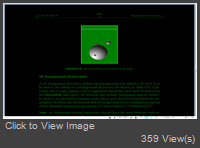
|
|
|
|
|
|
Forum Jump
You can post new topics in this forum.
You can reply to topics in this forum.
You can delete your posts in this forum.
You can edit your posts in this forum.
You cannot create polls in this forum.
You can vote in polls in this forum.
Important Information:
The Patagames Software Support Forum uses cookies. By continuing to browse this site, you are agreeing to our use of cookies.
More Details
Close
