Rank: Guest
Groups: Guests
Joined: 1/5/2016(UTC)
Posts: 162
Was thanked: 5 time(s) in 5 post(s)
|
Hi, if I load a pdf with a visible digital signature to my pdfviewer in a wpf formular, i don´t see the signature. If I use the winform version everything is fine. Is there something I need to program, for seeing it correctly? Maybe I need to configure something special at the pdfviewer ? 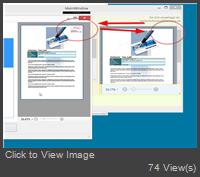 On the left is the winforms app, right the view of pdf in wpf. The visible dig. signature is missing. Maybe I´m doing it wrong ?! Xaml: Code:
<Wpf:PdfViewer Name="pdfViewer1" Document="{Binding Path=PdfDoc}" Height="Auto"/>
ModelView: Code:
PdfDoc = PdfDocument.Load(filename);
|
|
|
|
|
|
Rank: Administration
Groups: Administrators
Joined: 1/5/2016(UTC)
Posts: 1,140
Thanks: 10 times
Was thanked: 133 time(s) in 130 post(s)
|
That signature is implemented as a AcroForm, so you should enable AcroForm engine to drawing that signature (and other forms, such as textfields or comboboxes, too). You have three options to do that: 1. Recomended way #1You may load document through pdfViewer1.Load(...) method. A lot of actions are performed inside this method and AcroForm initialisation is one of them. You can find more details in source code of PdfViewer: https://github.com/Patag...blob/master/PdfViewer.cs2. Recomended Way #2 if it is not possible to use pdfViewer.Load method (due to mvvc limitations), then you should load document yourself in proper way. It is easy, just use following: PdfDocument.Load(path, new PdfForm()); In this case the forms engine will be enabled. 3. Way #3You can use this way if you do not need to interact with AcroForms, but just drawing forms. In this case you may set PdfViewer.RenderFlags property to FPDF_ANNOT. Please note, you should not do this in the first and second cases. Edited by user Monday, July 3, 2017 8:31:48 PM(UTC)
| Reason: Not specified
|
|
|
|
|
|
Forum Jump
You can post new topics in this forum.
You can reply to topics in this forum.
You can delete your posts in this forum.
You can edit your posts in this forum.
You cannot create polls in this forum.
You can vote in polls in this forum.
Important Information:
The Patagames Software Support Forum uses cookies. By continuing to browse this site, you are agreeing to our use of cookies.
More Details
Close
