Rank: Member
Groups: Registered
Joined: 3/10/2017(UTC)
Posts: 12
Thanks: 1 times
|
I am using a PrintDocument to print the PDF (see code) and I noticed that the quality of the graphics is very poor (see images, both printed from the same printer). I tried setting the SmoothingMode of the Graphics object to AntiAlias, but when stepping through in debug, the SmoothingMode never changes from None. Does anyone have any recommendations for how I can print with the quality like Adobe? Code:
printDocument = new PrintDocument();
printDocument.PrintPage += OnPrintPage;

private void OnPrintPage(object sender, PrintPageEventArgs e)
{
using (var page = this.pdfViewer.Document.Pages[this.nextToPrintPageIndex])
   {
       page.Render(
           e.Graphics,
           0,
           0,
           (int)((e.PageBounds.Width - 2 * e.PageSettings.HardMarginX) * e.Graphics.DpiX / 100f),
           (int)((e.PageBounds.Height - 2 * e.PageSettings.HardMarginY) * e.Graphics.DpiY / 100f),
           PageRotate.Normal,
           RenderFlags.FPDF_PRINTING);

       if (this.nextToPrintPageIndex < this.lastToPrintPageIndex)
       {
           this.nextToPrintPageIndex += 1;
           e.HasMorePages = true;
       }
    }
}
 MyApp.JPG (1,010kb) downloaded 26 time(s). Adobe.JPG (1,019kb) downloaded 25 time(s).Edited by moderator Wednesday, November 15, 2017 12:09:00 AM(UTC)
| Reason: Not specified
|
|
|
|
|
|
Rank: Member
Groups: Registered
Joined: 11/3/2017(UTC)
Posts: 7
Was thanked: 1 time(s) in 1 post(s)
|
Hi, Why don't you use the PdfPrintDocument class? As for your code, you can try rendering directly in the context of the device: e.Graphics.GetDC() and use this overload for rendering here PdfPageRender Method(by the way Pdf PrintDocument does it similarly). You can also try rendering in PdfBitmap, and you can print the already obtained image using standard methods. But in my opinion, the version presented in MyApp.jpg looks better and more correct than the version in Adobe.jpg And another question: How does this pdf appear in the viewer? Maybe you could send it for analysis? Thanks.
|
|
|
|
|
|
Rank: Member
Groups: Registered
Joined: 3/10/2017(UTC)
Posts: 12
Thanks: 1 times
|
Hi Pata, I tried the PdfPrintDocument class which significantly reduced the code, however the printed resolution was the same as before. I tried rendering to a PdfBitmap as is given here, but I get an exception when constructing the PdfBitmap object: Patagames.Pdf.Net.Exceptions.PdfiumException: Unexpected error code.
at Patagames.Pdf.Pdfium.ProcessLastError()
at Patagames.Pdf.Net.PdfBitmap..ctor(Int32 width, Int32 height, Boolean isUseAlpha)I noticed that the PdfPrint class uses the bitmap technique so I gave that a try and it worked, so I'm not sure why my code throws an exception. The result of rendering to a PdfBitmap is mostly good; the image fills are smooth, however the text is fuzzier. I'm wondering if the PdfDocumentPaginator isn't getting the selected printer's resolution? The displayed PDF looks great, so as a consumer, I would expect the default print quality to match what is displayed in the viewer. Just curious, why would you consider the version in MyApp.jpg to be more correct? If I print an image, I expect the printed fill to be smooth, not visibly blotchy. Edited by user Tuesday, November 14, 2017 4:35:31 PM(UTC)
| Reason: Not specified
|
|
|
|
|
|
Rank: Member
Groups: Registered
Joined: 3/10/2017(UTC)
Posts: 12
Thanks: 1 times
|
I notice that if I leave the print settings as All Pages, I do not get an exception when constructing the PdfBitmap. I got the exception when I had Current Page selected. I'm not sure why that option would even be relevant. But then I got an out of memory exception when trying to draw the image to the graphics object. Here is my code for what it's worth: Code:
private void OnPrintPage(object sender, PrintPageEventArgs e)
{
            using (var page = this.pdfViewer.Document.Pages[this.nextToPrintPageIndex])
            {
                // Printable area given in hundredths of an inch
                var fitSize = new System.Windows.Size(
                    (int)(e.PageSettings.PrintableArea.Width / 100 * e.Graphics.DpiX),
                    (int)(e.PageSettings.PrintableArea.Height / 100 * e.Graphics.DpiY));

                // Get page's size
                var pageSize = new System.Windows.Size(
                    (int)page.Width / 72.0f * e.Graphics.DpiX,
                    (int)page.Height / 72.0f * e.Graphics.DpiY);

                //If page was rotated in original file, then we need to "rotate the paper in printer".
                //For that just swap the width and height of the paper.
                if (page.OriginalRotation == PageRotate.Rotate270 || page.OriginalRotation == PageRotate.Rotate90)
                    fitSize = new System.Windows.Size(fitSize.Height, fitSize.Width);

                //Calculate the page's size fitted to the paper's size.
                var rSize = GetRenderSize(pageSize, fitSize);

                using (PdfBitmap bmp = new PdfBitmap((int)rSize.Width, (int)rSize.Height, true))
                {
                    //Render to PdfBitmap using page's Render method with FPDF_PRINTING flag.
                    page.RenderEx
                        (bmp,
                        0,
                        0,
                        (int)rSize.Width,
                        (int)rSize.Height,
                        PageRotate.Normal,
                        RenderFlags.FPDF_PRINTING | RenderFlags.FPDF_ANNOT);

                    //Rotates the PdfBitmap image depending on the orientation of the page
                    if (PageRotation(page) == PageRotate.Rotate270)
                        bmp.Image.RotateFlip(RotateFlipType.Rotate270FlipNone);
                    else if (PageRotation(page) == PageRotate.Rotate180)
                        bmp.Image.RotateFlip(RotateFlipType.Rotate180FlipNone);
                    else if (PageRotation(page) == PageRotate.Rotate90)
                        bmp.Image.RotateFlip(RotateFlipType.Rotate90FlipNone);

                    //Set DPI of the image same as the printer's DPI
                    (bmp.Image as Bitmap).SetResolution(e.Graphics.DpiX, e.Graphics.DpiY);
                    //Draw rendered image to printer's graphics surface
                    e.Graphics.DrawImage(bmp.Image, 0, 0);
                }

                if (this.nextToPrintPageIndex < this.lastToPrintPageIndex)
                {
                    this.nextToPrintPageIndex += 1;
                    e.HasMorePages = true;
                }
            }
}
Edited by moderator Wednesday, November 15, 2017 12:13:36 AM(UTC)
| Reason: Not specified
|
|
|
|
|
|
Rank: Administration
Groups: Administrators
Joined: 1/5/2016(UTC)
Posts: 1,140
Thanks: 10 times
Was thanked: 133 time(s) in 130 post(s)
|
Could you please provide pdf file?
|
|
|
|
|
|
Rank: Member
Groups: Registered
Joined: 3/10/2017(UTC)
Posts: 12
Thanks: 1 times
|
Here you go! Default Report.pdf (2,374kb) downloaded 22 time(s).
|
|
|
|
|
|
Rank: Member
Groups: Registered
Joined: 3/10/2017(UTC)
Posts: 12
Thanks: 1 times
|
Do you have any ideas why I am getting an exception when constructing a PdfBitmap object? That is currently the largest issue preventing me from experimenting further.
|
|
|
|
|
|
Rank: Administration
Groups: Administrators
Joined: 1/5/2016(UTC)
Posts: 1,140
Thanks: 10 times
Was thanked: 133 time(s) in 130 post(s)
|
Originally Posted by: TannerStevenson 
I get an exception when constructing the PdfBitmap object:
[b]Patagames.Pdf.Net.Exceptions.PdfiumException: Unexpected error code.
Please check parameters that you are passing into constructor. This exception may be thrown if the width or the height is less than zero. Also if these parameters are very huge. OutOfMemory exception may be throw in this case.
|
|
|
|
|
|
Rank: Member
Groups: Registered
Joined: 3/10/2017(UTC)
Posts: 12
Thanks: 1 times
|
I am passing in Width=4900 and Height=6341. Would the error have anything to do with the thread that I am instantiating the PdfBitmap on? When using a PrintDocument, it is being instantiating on the main thread, whereas the PdfDocumentPaginator is instantiating it on a background thread. That seems to be the only major difference between the PdfDocumentPaginator source code and mine. Edited by user Tuesday, November 21, 2017 9:02:33 AM(UTC)
| Reason: Not specified
|
|
|
|
|
|
Rank: Administration
Groups: Administrators
Joined: 1/5/2016(UTC)
Posts: 1,140
Thanks: 10 times
Was thanked: 133 time(s) in 130 post(s)
|
Originally Posted by: TannerStevenson Would the error have anything to do with the thread that I am instantiating the PdfBitmap on? I don't think so. Could you please create sample MSVS project where this issue can be reproduced? I will try to debug it on my side.
|
|
|
|
|
|
Rank: Member
Groups: Registered
Joined: 3/10/2017(UTC)
Posts: 12
Thanks: 1 times
|
I created a sample project and the exception never happened, which makes me believe that there is some resource access conflict in my main application since I did not change the print code at all. But I realized when playing around with the various ways to print that rendering to a bitmap tremendously increases the print time, so that will not be an acceptable solution anyway. The PdfPrintDocument is very convenient and is probably what I will end up using. Your libraries are so useful but I would really love to see a print quality to match the display quality. And based on the fact that some solid colors are printed with a good resolution (see image), I would imagine it should be possible. Comparison.jpg (586kb) downloaded 23 time(s).
|
|
|
|
|
|
Rank: Administration
Groups: Administrators
Joined: 1/5/2016(UTC)
Posts: 1,140
Thanks: 10 times
Was thanked: 133 time(s) in 130 post(s)
|
Did you try to print this document on a real printer to paper? I ask because if I look at your document on a print preview, it looks ugly. But when I print it to paper, it looks great! Also I try to print to virtual printers: XPS: 1.xps (212kb) downloaded 21 time(s).MicrosoftToPDF: MsToPdf.pdf (329kb) downloaded 20 time(s).And everything looks fine. Edited by user Friday, December 1, 2017 12:03:39 AM(UTC)
| Reason: Not specified
|
|
|
|
|
|
Rank: Member
Groups: Registered
Joined: 3/10/2017(UTC)
Posts: 12
Thanks: 1 times
|
Every picture that I have posted is of a printing on paper. Virtual printers work fine on my end too. When you say you printed it to paper and it looked great, how did you print it? Because if I open the pdf and print from the browser or adobe, the print quality is perfect. I tried a different printer and got a different fill pattern (see image and compare with previous post), which makes me wonder if your print code is optimized for certain print drivers and not others? Both the printers I am using are HP models. MyApp_Printer2.jpg (1,061kb) downloaded 17 time(s).
|
|
|
|
|
|
Rank: Administration
Groups: Administrators
Joined: 1/5/2016(UTC)
Posts: 1,140
Thanks: 10 times
Was thanked: 133 time(s) in 130 post(s)
|
Please check the quality setting of your printer. Looks like it set to "draft". Could you please provide a simple console app where this issue is reproduced? I will check it on my side. Also strange things are happening with that PDF file. I have took a photo of same place of printed pages which were printed from PDFViewer and AdobeReader. Please look at following 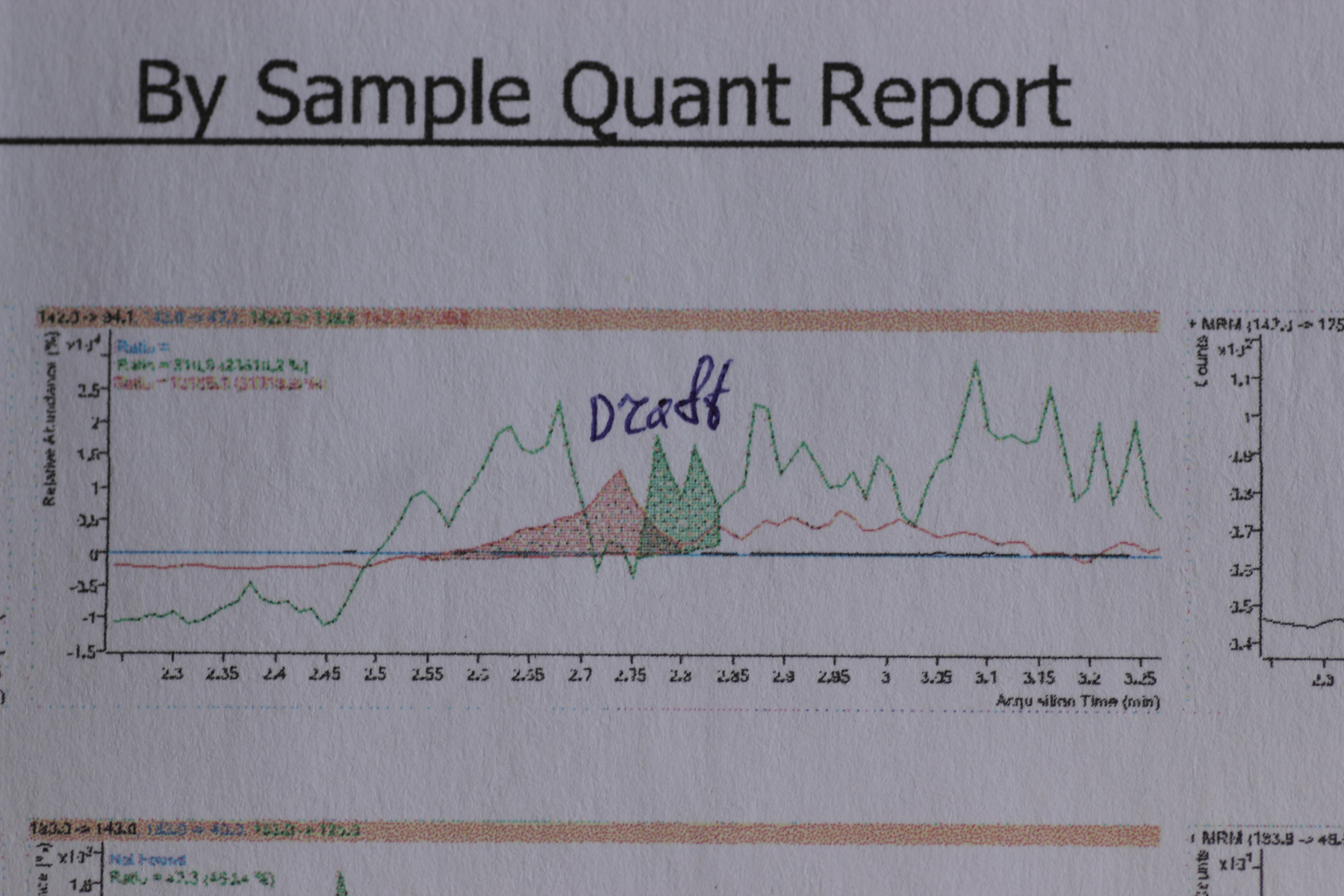 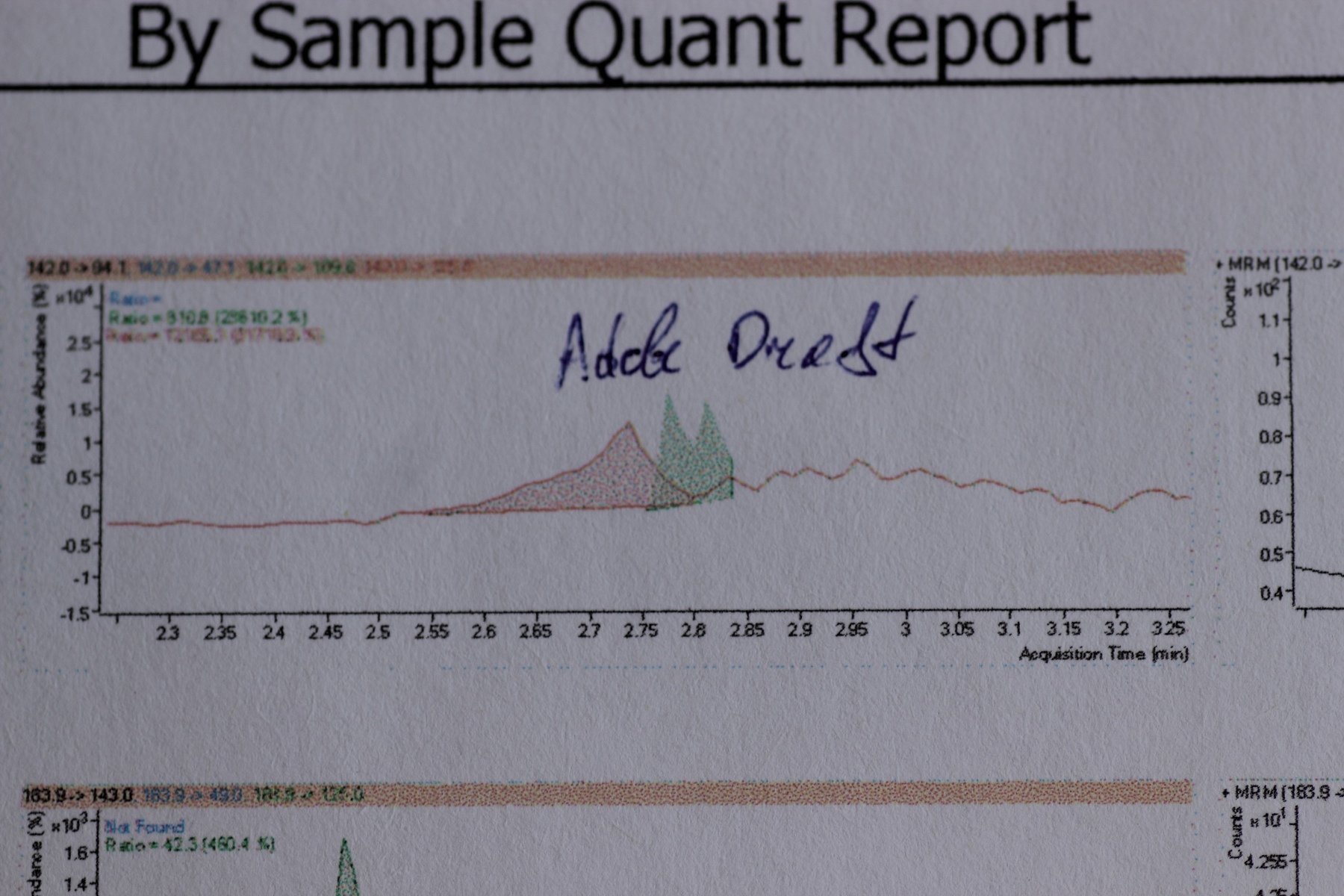 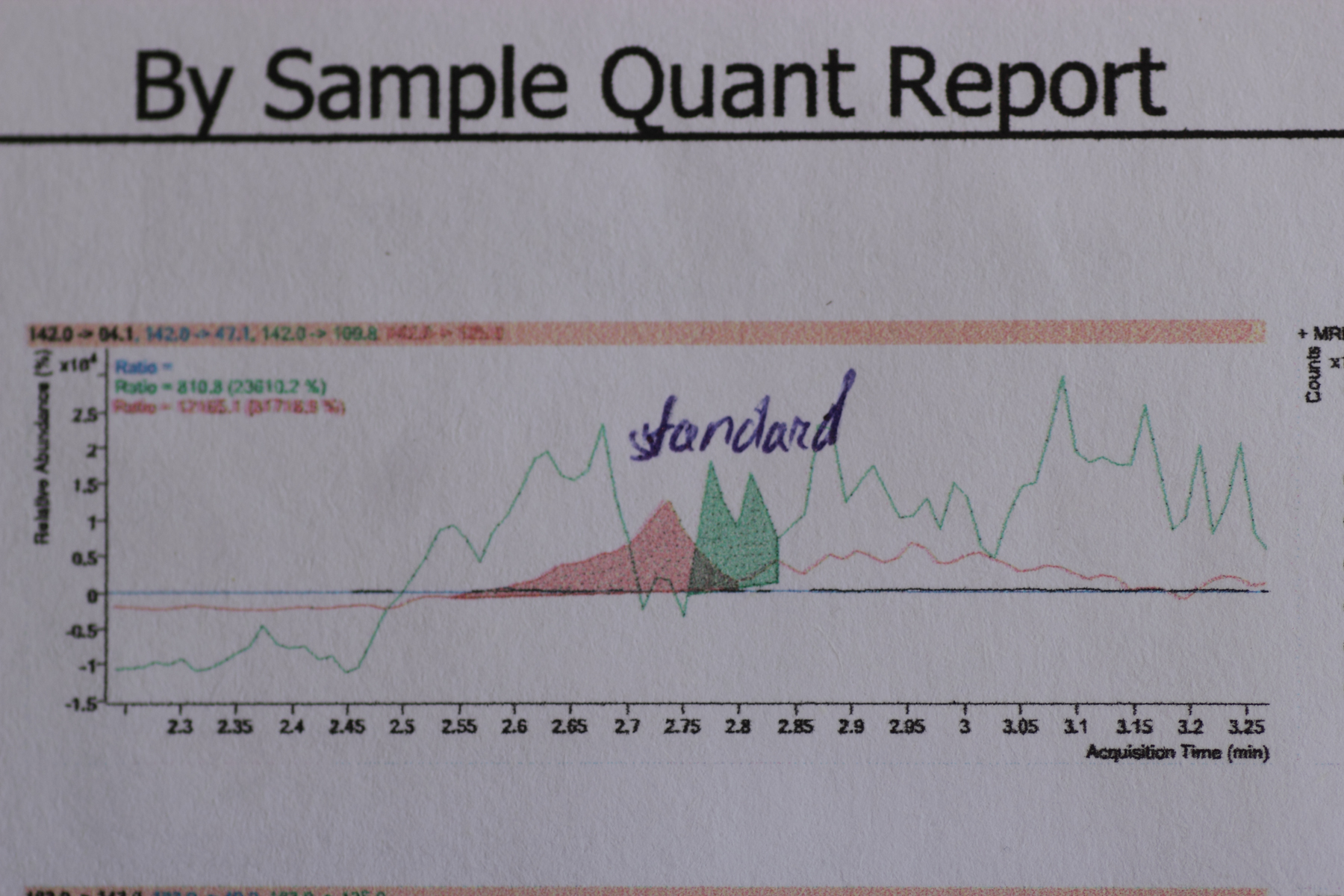 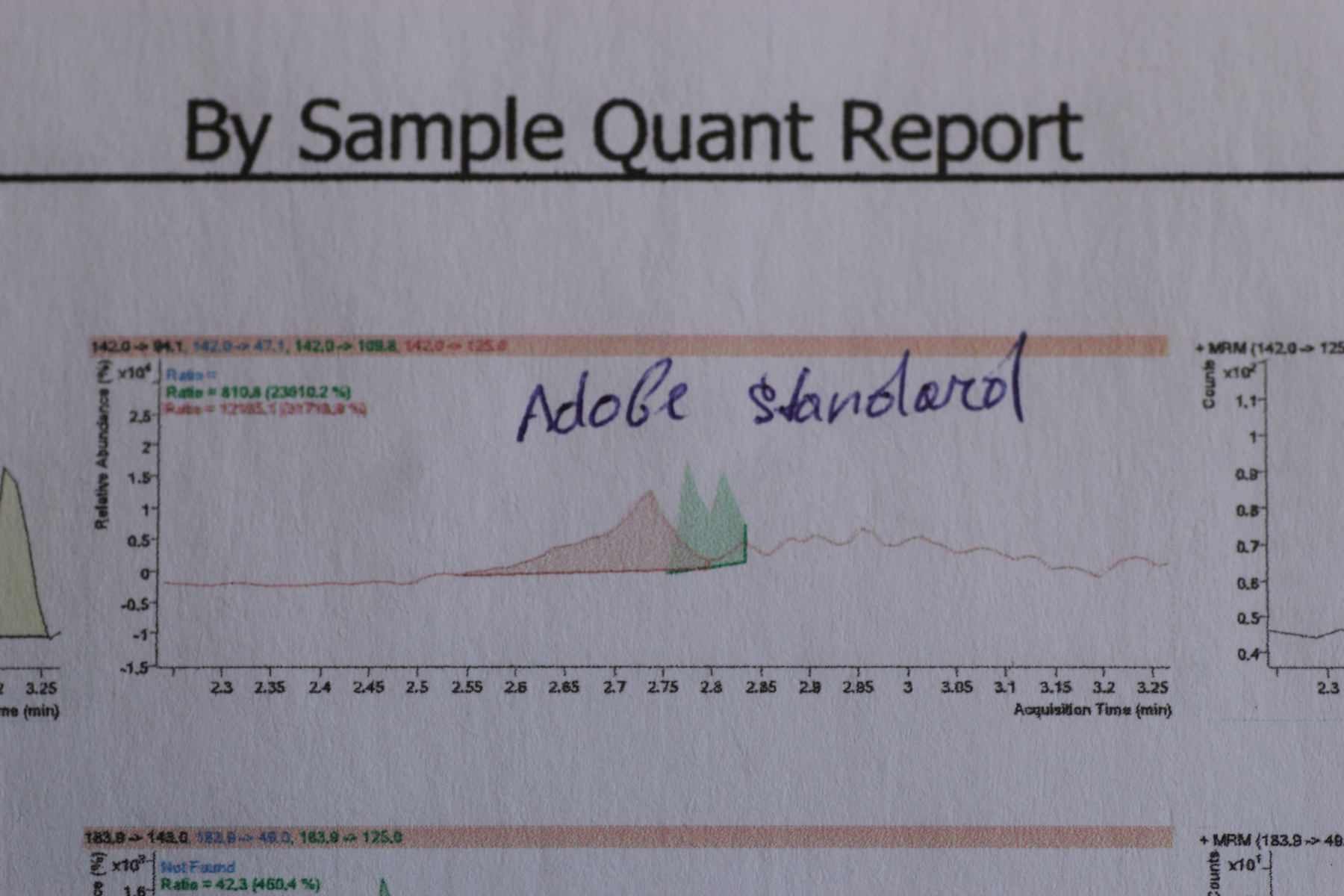 As you can see, the graphs differ from each other. Although this is the same place of same page. The pdf with scanned page: 20171212_00001.pdf (2,120kb) downloaded 19 time(s).About quality of filled areas. I don't see fatal difference between adobe and PDF viewer. The grain is present both there-and-there. I think this is limits by resolution of the device. Furthermore, the overall quality of PdfViewer better than of Adobe when printed on paper. Please compare PdfViewer-Standard and Adobe-Standard pages in attached PDF file. Edited by user Monday, December 11, 2017 6:21:53 PM(UTC)
| Reason: Not specified
|
|
|
|
|
|
Rank: Member
Groups: Registered
Joined: 3/10/2017(UTC)
Posts: 12
Thanks: 1 times
|
I can't seem to access my printer's properties, in neither my app nor adobe. So I am not sure what setting is being used. Is that setting something I can set in my code? If not, and it's set at the printer level, then wouldn't adobe and my app be using the same quality?
|
|
|
|
|
|
Rank: Administration
Groups: Administrators
Joined: 1/5/2016(UTC)
Posts: 1,140
Thanks: 10 times
Was thanked: 133 time(s) in 130 post(s)
|
Please try to print with following code. You may choose the print quality by clicking on printer settings button Code:
var doc = PdfDocument.Load(@"d:\1\Default Report.pdf");

//Show standard print dialog
var printDoc = new PdfPrintDocument(doc);
var dlg = new PrintDialog();
dlg.AllowCurrentPage = true;
dlg.AllowSomePages = true;
dlg.UseEXDialog = true;
dlg.Document = printDoc;
if (dlg.ShowDialog() == DialogResult.OK)
{
	try
	{
		dlg.Document.Print();
	}
	catch (Win32Exception)
	{
		//Printing was canceled
	}
}
And what about the difference between Pdfium and Adobe printed charts? Adobe does not have some lines. Did you notice it? Edited by user Thursday, December 14, 2017 7:17:39 PM(UTC)
| Reason: Not specified
|
|
|
|
|
|
Forum Jump
You cannot post new topics in this forum.
You cannot reply to topics in this forum.
You cannot delete your posts in this forum.
You cannot edit your posts in this forum.
You cannot create polls in this forum.
You cannot vote in polls in this forum.
Important Information:
The Patagames Software Support Forum uses cookies. By continuing to browse this site, you are agreeing to our use of cookies.
More Details
Close
