|
|
That signature is implemented as a AcroForm, so you should enable AcroForm engine to drawing that signature (and other forms, such as textfields or comboboxes, too). You have three options to do that: 1. Recomended way #1You may load document through pdfViewer1.Load(...) method. A lot of actions are performed inside this method and AcroForm initialisation is one of them. You can find more details in source code of PdfViewer: https://github.com/Patag...blob/master/PdfViewer.cs2. Recomended Way #2 if it is not possible to use pdfViewer.Load method (due to mvvc limitations), then you should load document yourself in proper way. It is easy, just use following: PdfDocument.Load(path, new PdfForm()); In this case the forms engine will be enabled. 3. Way #3You can use this way if you do not need to interact with AcroForms, but just drawing forms. In this case you may set PdfViewer.RenderFlags property to FPDF_ANNOT. Please note, you should not do this in the first and second cases.
|
|
|
Hi, if I load a pdf with a visible digital signature to my pdfviewer in a wpf formular, i don´t see the signature. If I use the winform version everything is fine. Is there something I need to program, for seeing it correctly? Maybe I need to configure something special at the pdfviewer ? 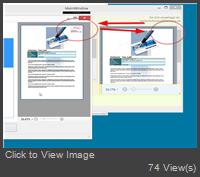 On the left is the winforms app, right the view of pdf in wpf. The visible dig. signature is missing. Maybe I´m doing it wrong ?! Xaml: Code:
<Wpf:PdfViewer Name="pdfViewer1" Document="{Binding Path=PdfDoc}" Height="Auto"/>
ModelView: Code:
PdfDoc = PdfDocument.Load(filename);
|
Important Information:
The Patagames Software Support Forum uses cookies. By continuing to browse this site, you are agreeing to our use of cookies.
More Details
Close
