|
|
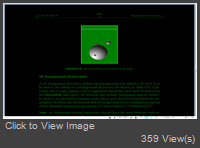
There is no a direct way to do that. Nut you can use the following workaround Code:
pdfViewer1.BeforeDocumentChanged += (s, e) =>
 {
	 if (pdfViewer1.Document != null)
		 pdfViewer1.Document.Pages.PageLoaded -= Pages_PageLoaded;
 };
pdfViewer1.AfterDocumentChanged += (s, e) =>
  {
	  if(pdfViewer1.Document!= null)
		  pdfViewer1.Document.Pages.PageLoaded += Pages_PageLoaded;
  };


private void Pages_PageLoaded(object sender, Patagames.Pdf.Net.EventArguments.PdfPageEventArgs e)
{
	foreach(var obj in e.Page.PageObjects)
	{
		obj.StrokeColor = Color.White;
		obj.FillColor = Color.Green;
	}
	pdfViewer1.PageBackColor = Color.Black;
}
|
|
|
Hi
Thanks for a great library so much better then some of the otherd that's 10 times more expensive!
Any example code on how to implement night mode?
Regards
Willie
|
Important Information:
The Patagames Software Support Forum uses cookies. By continuing to browse this site, you are agreeing to our use of cookies.
More Details
Close
