|
|
You can subscribe to the PageCollection.PageLoaded event, so everytime when the page is loaded into memory you inserts appropriate PDF objects Please look at code what illustrates the idea Code:
...
pdfViewer1.DocumentLoaded += PdfViewer1_DocumentLoaded;
...
private void PdfViewer1_DocumentLoaded(object sender, EventArgs e)
{
pdfViewer1.Document.Pages.PageLoaded += Pages_PageLoaded;
}
private void Pages_PageLoaded(object sender, Patagames.Pdf.Net.EventArguments.PdfPageEventArgs e)
{
//Firstly you need to insert image as a background for your text
//Create a PdfBitmap
PdfBitmap bmp = new PdfBitmap(200, 100, true);
bmp.FillRect(0, 0, 200, 100, Color.Red);
//Create image object and set previously created bitmap
var img = PdfImageObject.Create(e.Page.Document);
img.SetBitmap(bmp);
//Move image object to 0,0 and set it's size to 1px;
img.SetMatrix(1, 0, 0, 1, 0, 0);
//Scale image object to it's actual width and heihgt
img.Transform(bmp.Width, 0, 0, bmp.Height, 0, 0);
//Insert image object into page
e.Page.PageObjects.InsertObject(img);
//Then you can insert your text
PdfTextObject txtObj = PdfTextObject.Create();
txtObj.Font = PdfFont.CreateStock(pdfViewer1.Document, FontStockNames.Arial);
txtObj.FillColor = Color.Green;
txtObj.Transform(50, 0, 0, 50, 0, 0);
txtObj.Location = new PointF(50, 50);
txtObj.TextAscii = "Hello";
e.Page.PageObjects.InsertObject(txtObj);
//redraw PdfViewer control
pdfViewer1.UpdateLayout();
}
So you get something like this 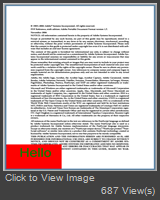
|
|
|
Hi,
How can add a rectangle with a white background and in this rectangle i need to add some string ?
I need to place this rectangle at the bottom right corner.
Thanks for your help.
|
