logo
Welcome Guest! To enable all features please Login or Register.

Notification

Icon
Error

Post a reply
From:
Message:

Maximum number of characters in each post is: 32767
Bold Italic Underline   Highlight Quote Choose Language for Syntax Highlighting Insert Image Insert an existing Attachment or upload a new File... Create Link   Unordered List Ordered List   Left Justify Center Justify Right Justify   Outdent Indent   More BBCode Tags
Font Color Font Size
Security Image:
Enter The Letters From The Security Image:
  Preview Post Cancel

Last 10 Posts (In reverse order)
Paul Rayman Posted: Friday, April 23, 2021 7:18:11 PM(UTC)
 
One more example

Code:

using (var doc = PdfDocument.Load(@"e:\0\1GB\source.pdf"))
{
    Console.WriteLine($"size: {doc.Pages[0].Width}x{doc.Pages[0].Height}");
    foreach (var page in doc.Pages)
    {
        page.MediaBox = new FS_RECTF(-500, page.Height + 500, page.Width + 500, -500);
        page.CropBox = page.MediaBox;
    }

    doc.Save(@"e:\10\target.pdf", SaveFlags.NoIncremental);
}


Source: iX6p7hagyM.png
Target: 0QqRMmFNf6.png
oberon232 Posted: Sunday, February 24, 2019 11:54:33 AM(UTC)
 
Paul Rayman, you absolutely rock!
Thanks a ton.
Paul Rayman Posted: Sunday, February 24, 2019 5:56:45 AM(UTC)
 
This code works fine for me

Code:
var pageDict = pdfViewer1.CurrentPage.Dictionary;
var mediaBox = pageDict["MediaBox"].As<PdfTypeArray>();
mediaBox[3] = PdfTypeNumber.Create(mediaBox[3].As<PdfTypeNumber>().FloatValue + 72);
pdfViewer1.CurrentPage.Dispose();
pdfViewer1.UpdateLayout();


I guess you should call both page.Dispose() to force the page to reload and pdfViewer1.UpdateLayout() to force PdfViewer to redraw itself;
oberon232 Posted: Sunday, February 24, 2019 5:34:45 AM(UTC)
 
Modifying the crop and media boxes in the page's dictionary doesn't appear to affect how the viewer displays the page, and the PdfViewer1.CurrentPage.Height remains the same after the change.
Is there a step I'm missing to apply the change?

Here's my code (it's in VB.net)
Code:
Private Sub btnConfidential_Click(sender As Object, e As EventArgs) Handles btnConfidential.Click
        Dim doc As PdfDocument = PdfViewer1.Document
        Dim pageDict As PdfTypeDictionary = doc.Pages(PdfViewer1.CurrentIndex).Dictionary

        Dim cropBox As PdfTypeArray = pageDict("CropBox").As(Of PdfTypeArray)
        Dim mediaBox As PdfTypeArray = pageDict("MediaBox").As(Of PdfTypeArray)

        cropBox(3) = PdfTypeNumber.Create(cropBox(3).As(Of PdfTypeNumber).FloatValue + 72)
        mediaBox(3) = PdfTypeNumber.Create(mediaBox(3).As(Of PdfTypeNumber).FloatValue + 72)

        pageDict("CropBox") = cropBox
        pageDict("MediaBox") = mediaBox

        ToolStripLabel1.Text = cropBox(0).As(Of PdfTypeNumber).FloatValue & "," &
                               cropBox(1).As(Of PdfTypeNumber).FloatValue & "," &
                               cropBox(2).As(Of PdfTypeNumber).FloatValue & "," &
                               cropBox(3).As(Of PdfTypeNumber).FloatValue & "   " &
                               PdfViewer1.CurrentPage.Height

        PdfViewer1.Refresh()
    End Sub
Paul Rayman Posted: Sunday, February 24, 2019 1:51:25 AM(UTC)
 
Hi,

Seems you need to change one or more of the following boundaries

MediaBox - (Required; inheritable) A rectangle (see Section 3.8.4, “Rectangles”), ex
pressed in default user space units, defining the boundaries of the physical
medium on which the page is intended to be displayed or printed (see
Section 10.10.1, “Page Boundaries”).

CropBox - (Optional; inheritable) A rectangle, expressed in default user space units,
defining the visible region of default user space. When the page is dis
played or printed, its contents are to be clipped (cropped) to this rectangle
and then imposed on the output medium in some implementation
defined manner (see Section 10.10.1, “Page Boundaries”). Default value:
the value of MediaBox.

BleedBox - (Optional; PDF 1.3) A rectangle, expressed in default user space units, de
fining the region to which the contents of the page should be clipped
when output in a production environment (see Section 10.10.1, “Page
Boundaries”). Default value: the value of CropBox.

TrimBox - (Optional; PDF 1.3) A rectangle, expressed in default user space units, de
fining the intended dimensions of the finished page after trimming (see
Section 10.10.1, “Page Boundaries”). Default value: the value of CropBox.

ArtBox - (Optional; PDF 1.3) A rectangle, expressed in default user space units, de
fining the extent of the page’s meaningful content (including potential
white space) as intended by the page’s creator (see Section 10.10.1, “Page
Boundaries”). Default value: the value of CropBox.
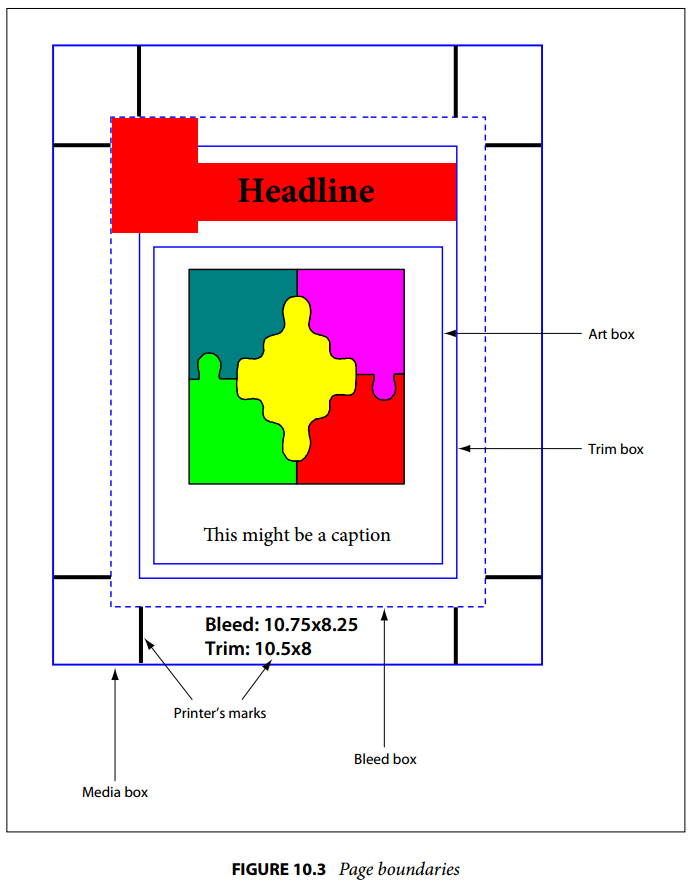
Page boundaries

Here is an example how to get these boxes
https://forum.patagames....-and-trimbox-of-the-Page

Changing these properties is the opposite. Something like this

Code:
var array = PdfTypeArray.Create();
array.Add(PdfTypeNumber.Create(left));
array.Add(PdfTypeNumber.Create(bottom));
array.Add(PdfTypeNumber.Create(right));
array.Add(PdfTypeNumber.Create(top));
pageDict["CropBox"] = array;
oberon232 Posted: Saturday, February 23, 2019 9:29:35 PM(UTC)
 
How do you resize and existing page in a pdf?
Specifically, I want to add space on the top of the page so I can insert a text object without covering over any of the existing page.